
This document explains how to set breakpoints to pause execution of the 68K Simulator.
 |
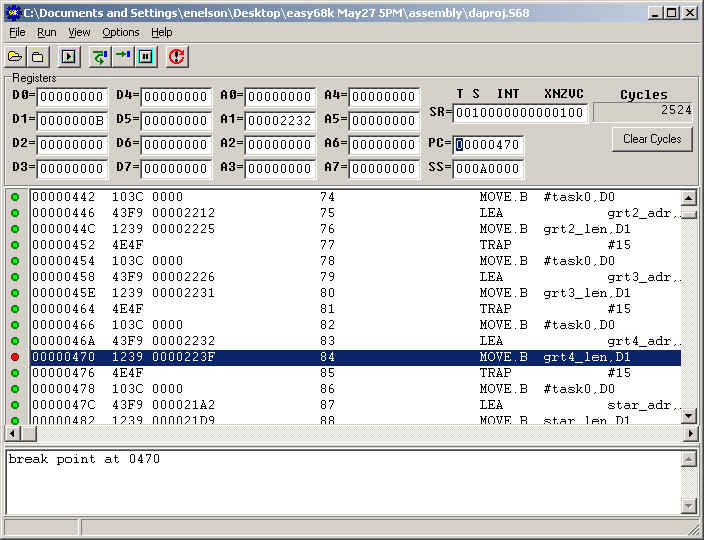
Main Simulator Window - Can set breakpoints at PC counter only. |
|
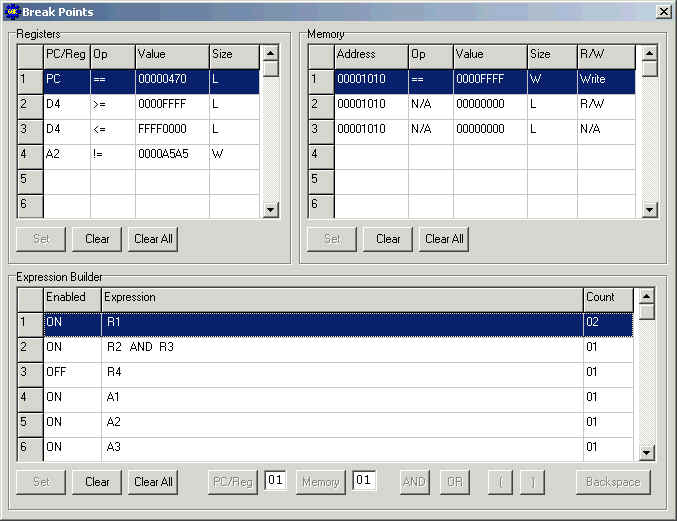
Breakpoints Window - Can set breakpoints at PC counter, Registers, and Memory locations. |
|
Initially all circles in the paint box to the left of the simulator source code window will be green. |
|
Set a breakpoint at a specific PC by clicking on the green circle to the left of the corresponding PC. |
|
Each green circle that is clicked will turn red, indicating that the breakpoint is set. |
|
Turn off the breakpoint by clicking on any red circle. |
|
Each red circle that is clicked will turn green, indicating that the breakpoint is not set. |
|
(Note! The simulator will allow you to set a Break-Point at addresses that do not contain 68000 instructions but the simulator will NOT Break unless the Break-Point is placed at the address of an instruction.) |
(To view the Breakpoints Window, click on the View -> Break Points menu option of the Main Simulator Window.)
|
Initially all cells in the Registers Grid, Memory Grid, and Expression Builder Grid will be empty. |
|
Define a Breakpoint Resource by double-clicking a row in the Registers Grid or Memory Grid. |
|
In the editable fields that appear in the cells, enter the Breakpoint Resource data. |
|
Click on the Set Button in the appropriate grid to save the Breakpoint Resource data. |
|
Use one or more Breakpoint Resources by double-clicking a row in the Expression Builder Grid. |
|
In the editable fields that appear in the cells, build an appropriate Logical Breakpoint Expression from the Breakpoint Resources and Operator Buttons. |
|
Click on the Set Button in the Expression Builder Grid to save the Logical Breakpoint Expression. |
Glossary
Breakpoint Resource - Can be used as an operand in a Logical Breakpoint Expression. For a break to occur based upon this resource, it must be used in at least one expression. Simply defining a resource in either the Registers Grid or Memory Grid does not activate the breakpoint.
Clear Button - Clears the selected row within its corresponding grid.
Clear All Button - Clears all rows within its corresponding grid.
Expression Builder Grid - Used to capture Logical Breakpoint Expression data. The "Enabled" field determines whether or not to check the corresponding "Expression" during simulator execution. The "Count" field determines how many times the "Expression" must be true before breaking execution.
Logical Breakpoint Expression - These define the only breakpoint conditions actually tested during simulator execution (except PC counter breakpoints set via the Main Simulator Window).
Memory Grid - Used to capture Breakpoint Resource data for Memory breakpoints. The "Address" field specifies which location in memory should be tested. The "Op" field specifies the desired relation of the value found at the "Address" to the specified "Value". By selecting N/A in the "Op" field, the user is indicating that he/she doesn't care what value is found at the specified "Address". The "Value" field captures the value that should be relationally equivalent to the value found at the specified "Address". The "Size" indicates whether byte, word, or long word values should be compared. The "R/W" field specifies whether the break should only occur on a read or write. By selecting N/A in the "R/W" field, the user is indicating that he/she doesn't care if the current instruction caused a read or write to the specified "Address". (Note! If N/A is selected in the "Op" field and the "R/W" field (assuming an expression has been built from this resource), the simulator will break on every instruction regardless. The user has specified that he/she doesn't care about the value at the address and doesn't care whether or not the current instruction is reading or writing to that location. The only thing the user cared about was that the address existed!)
Operator Buttons - Consists of logical AND, OR buttons, as well as left and right parentheses buttons that can be used to build Logical Breakpoint Expressions.
Registers Grid - Used to capture Breakpoint Resource data for PC Counter or Register breakpoints. The "PC/Reg" field specifies which register or PC should be tested. The "Op" field specifies the desired relation of the value found at the "PC/Reg" to the specified "Value". The "Value" field captures the value that should be relationally equivalent to the value found at the specified "PC/Reg". The "Size" indicates whether byte, word, or long word values should be compared.
Set Button - Sets the Breakpoint Resource data (within either Registers Grid or Memory Grid) or the Logical Breakpoint Expression data (within the Expression Builder Grid).